AI, here.

No cloud upload.
Data stays inside.

AI runs inside your facility. Everyday use needs no internet connection.

KOKODE handles the equipment and setup.

Download the doctor deck (PDF)

The challenge: medical images

Some images medicine needs
cannot be generated.

Anatomical and surgical illustrations matter in medicine. Consumer AI services may restrict their generation under their usage rules.

Example: referral letters

Draft a progress summary
inside.

Create a draft summary for a referral letter from clinical progress notes. The clinician reviews and finishes it.

※Start with information search, summaries, document drafting and research support rather than diagnosis itself. Healthcare professionals perform the final review and judgment.

Try this workflow
kokode.local
Progress notes 72-year-old womanAdmitted with a right femoral neck fractureDay 14 after hip hemiarthroplastyHistory: hypertension and type 2 diabetes

Summarize this patient’s progress for a referral letter

Referral progress summary (draft) Hip hemiarthroplasty performed for a right femoral neck fracture.Recovery is progressing well; gait training with a walker continues.Oral medication continues for hypertension and type 2 diabetes.
Drafting a referral summary from fictional patient progress notes ※Fictional patient data※Illustrative screen※AI output is a draft. Healthcare professionals must review the content and make the final judgment.

Example: explanatory diagrams

Draft presentation diagrams
inside.

Ask for a gluteal anatomy diagram, and KOKODE drafts the line drawing and arranges it into a presentation slide.

Try this workflow
kokode.local

Create a gluteal anatomy diagram for a presentation

Create a line drawing
Gluteal anatomy Draft created with AI inside the facility
Arrange a slide
Drafting a line drawing and arranging it into a presentation slide ※Illustrative screen※AI output is a draft. Healthcare professionals must review the content and make the final judgment.

KOKODE

AI that runs inside,
for your facility.

KOKODE runs AI on equipment installed in your facility. Patient-data work stays inside, with no internet connection needed for everyday use.

※Configured not to send patient data to external LLMs during normal operation

Where data goes

Patient data goes
to AI inside.

※Configured not to send patient data to external LLMs during normal operation

Before
  1. Patient data
  2. Cloud AI
  3. Concerns / limits
KOKODE
Inside
  1. Patient data
  2. KOKODE
  3. AI inside
Where patient data goes: cloud AI and KOKODE

Connection boundary

AI for your facility
network only.

Only signed-in devices on an authorized facility network, via wired LAN or staff Wi-Fi, can use KOKODE. It cannot be reached from outside. We configure it separately from patient Wi-Fi.

Inside
Staff network
  • PC
  • Tablet
KOKODE
Patient Wi-Fi
Outside No connection
Only signed-in devices on authorized facility networks connect

How to use it

Open your browser.
Work as usual.

On a PC or tablet connected to the staff network, open kokode.local in your browser and sign in. Ask through chat, as with ChatGPT. You do not need to sit at the server.

kokode.local

Summarize three hand hygiene moments from our facility manual

KOKODE 1. Before and after touching a patient2. Before a clean or aseptic procedure3. When body fluid exposure may have occurred
KOKODE chat on a staff PC ※Illustrative screen

One coordinated setup

KOKODE sets it up.
Your team uses it.

Equipment, AI models, facility knowledge, workflow agents and chat. KOKODE configures the whole set, including sign-in and backups, before delivery.

After delivery, your team uses it without technical setup work. KOKODE also handles updates and operational support.

  1. Chat interfaceStaff use a browser
  2. AgentsWorkflow-specific steps
  3. Facility knowledgeDocuments, chat and workflows
  4. AI modelsRun on equipment inside
  5. HardwareEquipment installed inside Illustration of equipment KOKODE installs inside the facility
What KOKODE installs together

Your facility’s assets

What you build inside
stays yours.

Documents, conversations, workflows and settings stay inside and belong to your facility.

The AI model is a replaceable part. Your accumulated knowledge stays yours when the model changes.

Updates and backups

Keep updates and backups
under your control.

Bring update files inside by USB or similar media, without connecting to the internet.

Backups go to storage managed by your facility, never to KOKODE’s cloud.

Getting started

One device.
One workflow.

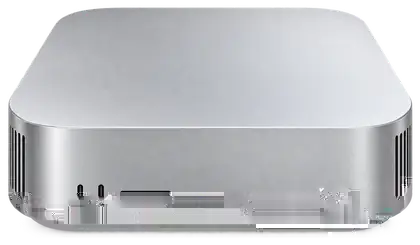
You do not need a GPU rack to start. Begin by trying one workflow on one small device.

If you outgrow one device, we will size the equipment to your facility with you. Larger equipment keeps the same experience.

PoCJPY 300,000+Reference pricing for a pilot (proof of concept). We quote individually based on scope.

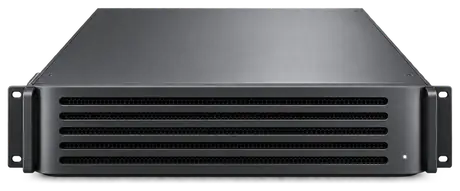
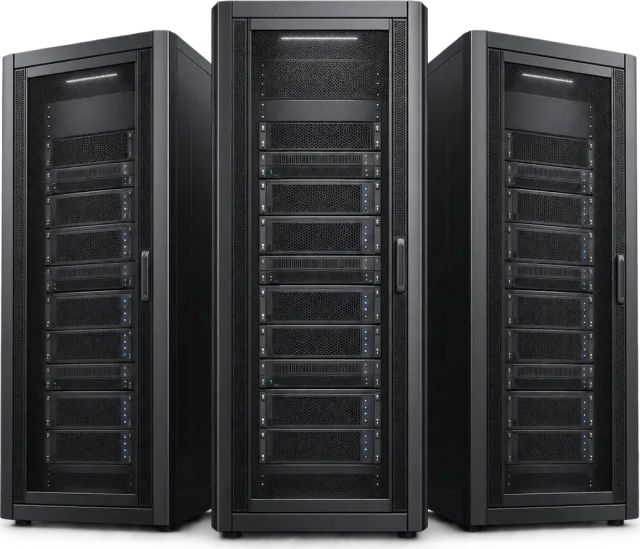
※Illustrative equipment; actual appearance and configuration may differ

  • Illustration of a compact device installed inside
    Small clinicStart here
  • Illustration of rack-mounted server equipment
    Mid-sized facilityAsk us
  • Illustration of a row of server cabinets
    Hospital or research instituteAsk us
Illustrative equipment for facilities of different sizes

Pilot

Try one workflow
inside.

  1. Choose one workflowOne task you want AI to handle but cannot send to the cloud, such as referral letters, searching internal documents, explanatory materials or documents from audio.
  2. Install one device insideKOKODE handles equipment preparation and setup.
  3. Use it in practiceStaff use it in their browsers, and we assess the results together.

Talk with us

Bring one task
you want AI to handle
but cannot send to the cloud.

Choose the workflow you want to try. We will walk you through the pilot.

※KOKODE does not replace judgment by healthcare professionals.

We use your information for consultations and guidance about KOKODE pilots and installation. Do not submit confidential information such as patient or clinical data.Privacy policy (Japanese)